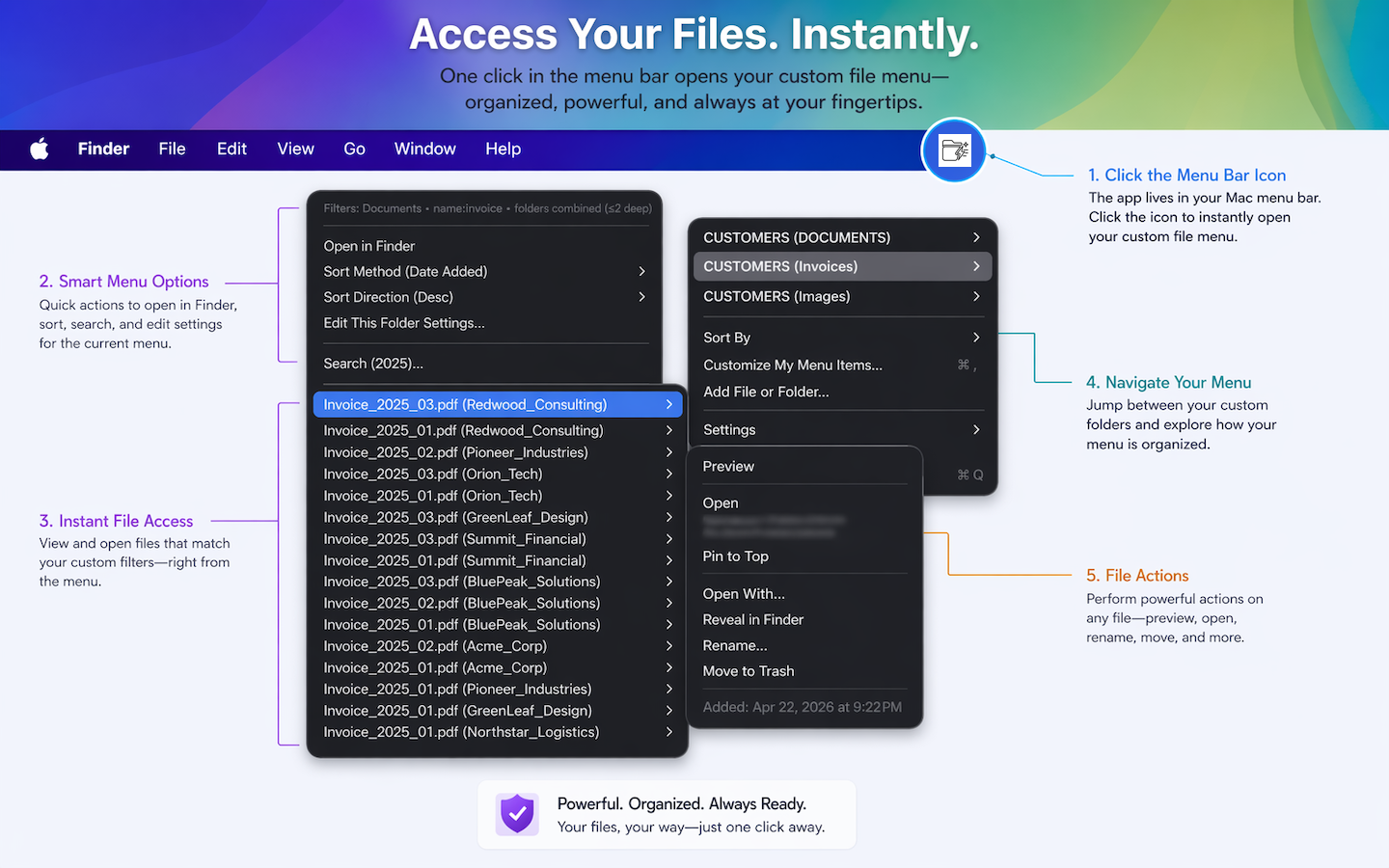
Quick access to important folders
Instead of opening Finder and drilling down through folders, you can pin frequently used locations directly to the menu bar.
Examples include current project folders, client folders, Downloads subfolders, invoices, photos, shared cloud folders, and frequently used apps and web links.
A saved folder can act like a dynamic smart view
A saved folder can show only PDFs, files modified in the last 7 days, spreadsheets matching a naming pattern, files from multiple subfolders combined into one list, or folders named “Invoices” anywhere inside a hierarchy.
From a folder submenu you can open, preview, search, pin, reveal, share, rename, move, and trash
From a folder submenu you can open files, preview files, search within folders, pin frequently used items, reveal items in Finder, share files, rename files, move files, and send files to Trash.
You can rename, reorder, color, icon, duplicate, and extend the menu
You can rename menu items without changing the real file or folder name, reorder items, apply colors and icons, duplicate configurations with different filters, and add web links alongside folders and files.
Faster access, persistent filtered views, and multiple views of the same folder
Finder requires opening windows and navigating. FolderyMenu lets you click the menu bar icon, jump directly into saved locations, and open files in a few clicks. It can also save folder rules such as PDFs only, recent files only, specific extensions only, and specific naming patterns, and those rules stay attached to that menu item.
You can save the same folder multiple times with different filters, such as “Invoices – Current Month”, “Invoices – PDFs”, and “Invoices – Last 7 Days”, all pointing to the same real folder.
Many actions can be done without opening Finder at all: browse folders, search, preview, open recent items, and access pinned items. The goal is to reduce context switching.
FolderyMenu can also open filtered results in its own Finder-like window called “Foldery Folder”, while preserving the active filters, search terms, and sorting.
FolderyMenu is more like a Finder add-on for power users than a replacement
Finder is still the right tool for full filesystem management, large-scale organization, complex drag-and-drop work, disks and network volumes, broad Mac-wide searches, and bulk file operations.
FolderyMenu is designed for a different job: keeping the folders, files, and views you use every day fast, focused, and easy to open from the menu bar. It is a shortcut and productivity layer on top of Finder, not a full file catalog or a complete replacement.
If you are a designer working with client folders
If you are a designer working in a structure such as Clients → Acme, Beta, Gamma, Finder workflow means opening Finder, navigating to Clients, opening the client folder, and searching or sorting. FolderyMenu workflow means saving each client folder as a menu item, adding a filtered view showing only recent PDFs, pinning frequently used files, and accessing everything directly from the menu bar.
That can save dozens or hundreds of navigation steps each day.